
Download Gepetto AI – Free AI Interior Design & Virtual Staging Tool
Overview: Transform Any Space with AI‑Powered Staging
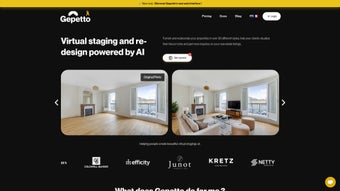
Gepetto AI is a cloud‑based design platform that leverages advanced artificial‑intelligence algorithms to turn a single photograph of an interior or exterior area into a fully‑furnished, photorealistic rendering in just seconds. The service is built for three core audiences: homeowners who want to visualise a remodel before buying paint or furniture, real‑estate agents looking for fast, cost‑effective virtual staging, and professional interior designers who need to generate multiple style concepts without spending hours in traditional 3D software. By offering more than thirty curated design styles—ranging from sleek Scandinavian minimalism to warm mid‑century modern and bold industrial lofts—Gepetto AI lets users experiment with colour palettes, furniture layouts, and even landscape features with a drag‑and‑drop interface that feels as intuitive as a social‑media photo editor.
Because the engine runs entirely in the browser, there is no heavy client‑side installation, no need for a dedicated graphics card, and the tool works on any device that can run a modern web browser. Security and privacy are baked in: all uploads travel over HTTPS, are processed on encrypted servers, and are automatically deleted after rendering, ensuring that personal photos never linger in the cloud. Whether you are preparing a marketing brochure, a client presentation, or simply day‑dreaming about a new living‑room look, Gepetto AI delivers a fast, reliable, and user‑friendly experience that brings professional‑grade visualisation to anyone with an internet connection.
Key Features that Set Gepetto AI Apart
- Instant AI Rendering: Upload one photo and receive a complete, furnished scene in under 30 seconds.
- 30+ Design Styles: Choose from a library of professionally curated aesthetics, each with its own furniture set, lighting scheme, and colour scheme.
- Dynamic Wall‑Color Switcher: Change paint colours on‑the‑fly without re‑uploading the image.
- Outdoor & Landscape Visualiser: Extend the AI’s capabilities to patios, balconies, and garden spaces.
- Integrated Shopping Links: Every piece of furniture generated is linked to a real‑world product page, allowing direct purchase via affiliate partners.
- Real‑Time Editing Tools: After the AI creates the base scene, you can move, resize, or recolour individual items to fine‑tune the result.
- High‑Resolution Export: Download final renders in 4K PNG or JPEG for marketing, client decks, or personal archives.
- Cross‑Platform Web Access: Works on Windows, macOS, Linux, iOS, and Android browsers without any additional software.
- Secure Cloud Processing: Images are encrypted during upload and automatically purged after rendering.
- Free Tier with Premium Upgrades: Core functionality is free; paid plans unlock unlimited renders, brand‑able outputs, and priority processing.
Why These Features Matter for Different Users
Real‑estate professionals benefit most from the rapid staging capability, turning vacant listings into fully‑furnished showrooms that attract buyers and reduce time‑on‑market. Homeowners gain confidence by instantly visualising colour changes and furniture swaps, preventing costly mis‑purchases. Interior designers appreciate the ability to generate multiple style concepts in a single session, speeding up client approvals and allowing more creative exploration. Landscape architects can now mock‑up garden layouts without leaving the browser, and the integrated shopping links streamline the procurement process for anyone who decides to purchase the suggested items. Together, these features create a versatile toolbox that bridges the gap between inspiration and execution, all while keeping the user experience simple and secure.
Installation, Setup, and How to Use Gepetto AI Effectively
Gepetto AI eliminates traditional installation steps because it is a pure web application. To get started, simply open a supported browser—Chrome, Firefox, Edge, or Safari—on any device, navigate to the official site, and create a free account using an email address and password. After verifying your email, you are taken to a clean dashboard where the “Upload Photo” button sits prominently at the top. The workflow is deliberately linear to minimise friction: upload, select style, edit, and export.
Step‑by‑Step Guide (≈ 7 minutes)
- Open your preferred browser on Windows, macOS, Linux, iOS, or Android.
- Visit gepetto.ai and click “Sign Up”.
- Confirm the verification email, then log in.
- Select “Upload Image” and choose a high‑resolution photo of the space you wish to redesign.
- Pick a design style from the sidebar or let the AI suggest one based on room attributes.
- Review the generated scene; use the real‑time editor to adjust wall colours, move furniture, or replace items.
- When satisfied, click “Export” to download a 4K PNG/JPEG or click “Shop Items” to view purchase links for each piece of furniture.
Compatibility: Because Gepetto AI runs on WebGL, any modern browser that supports hardware‑accelerated graphics will provide a smooth experience. This includes Windows 10/11, macOS Monterey or later, most Linux distributions, iOS 13 +, and Android 9 +. While the AI calculations happen in the cloud, the client side still benefits from a GPU‑enabled browser for faster preview rendering.
Progressive Web App (PWA) Option
Frequent users can install Gepetto AI as a lightweight Progressive Web App. After visiting the site three times, a browser prompt will appear offering “Add to Home Screen”. Selecting this creates an app‑like icon on your desktop or mobile home screen, caches UI assets for faster loading, and provides offline access to the interface—though AI rendering still requires an internet connection. The PWA approach gives the feel of a native app without the overhead of a traditional download.
Security and Data Privacy
All data transfers are protected with TLS 1.3 encryption. Uploaded images are stored only in temporary memory and are automatically erased within five minutes of rendering. Users in the European Economic Area benefit from GDPR‑compliant controls, including a “Delete My Data” button in the account settings. Enterprise customers can request a dedicated VPN tunnel and on‑premise image processing for added confidentiality, though this is optional and incurs an additional subscription fee.
Pros, Cons, FAQs, and Final Thoughts – Why You Should Download Gepetto AI Today
Pros
- Instant, cloud‑based AI rendering with results in seconds.
- Wide library of over thirty professionally curated design styles.
- Free tier provides generous monthly usage before any payment is required.
- Integrated shopping links turn virtual décor into real purchases.
- Works on any modern browser—no heavy software downloads needed.
- GDPR‑compliant, end‑to‑end encryption protects user photos.
- Real‑time editing lets you fine‑tune AI‑generated scenes.
- High‑resolution 4K export suitable for marketing or client presentations.
- Optional Progressive Web App offers an app‑like experience.
- Responsive support team with tutorials, webinars, and a community forum.
Cons
- Requires an active internet connection; offline functionality is limited to UI.
- Highly cluttered rooms may produce less accurate AI results.
- Free plan caps high‑resolution exports and total renders per month.
- Advanced lighting and material controls are not yet available.
- Affiliate shopping links may not always reflect the lowest market price.
Gepetto AI delivers a compelling mix of speed, style variety, and shopping integration that makes it stand out in the crowded interior‑design‑app market. While the reliance on cloud processing and occasional rendering quirks are minor drawbacks, the generous free tier and continuous feature updates provide excellent value for both casual users and professionals.
Frequently Asked Questions
Can I use Gepetto AI on a mobile device?
Yes. The platform is fully responsive and works on iOS Safari and Android Chrome. You can also install the PWA for a native‑app feel.
Is there a limit to how many photos I can upload for free?
The free tier allows up to 20 AI renders per month, with a maximum of five 4K exports. Paid plans remove these limits.
How secure is my uploaded image?
All uploads travel over HTTPS, are encrypted in transit, processed on secure servers, and automatically deleted after rendering. You can also request immediate deletion at any time.
Can I customise the AI‑generated furniture beyond the preset styles?
Yes. After the AI creates the initial scene, you can drag, resize, recolour, or replace individual pieces using the built‑in editor before exporting.
Do I need a powerful computer to run Gepetto AI?
No. Since the heavy AI processing occurs on Gepetto’s cloud servers, even modest laptops or tablets can generate renders quickly. A modern browser with WebGL support is the only hardware requirement.
Conclusion – Take the Next Step in Visualising Your Space
Gepetto AI democratizes high‑end interior visualisation by offering a fast, secure, and entirely browser‑based solution that requires no expensive licenses or steep learning curves. Whether you’re a real‑estate agent aiming to stage vacant properties, a homeowner planning a remodel, or a designer seeking rapid concept iteration, the platform delivers professional‑grade results with just a few clicks. The free tier provides ample room to experiment, while premium plans unlock unlimited renders, brand‑able assets, and priority processing for power users. By turning imagination into actionable design instantly, Gepetto AI helps you close deals faster, make smarter purchase decisions, and impress clients with stunning visual proposals.
Ready to see your space transformed in seconds? Download Gepetto AI now, create your first AI‑generated room, and experience the future of interior design today.



.png)



